Introduction To Computer Science
Introduction to Computer Science and Fundamentals
Exam Focus: This unit lays the groundwork for understanding computers. Pay close attention to definitions, historical context, characteristics, types, and applications, as these are frequently tested concepts.
1.1 Definition of Computer
A computer is an advanced electronic device that operates on the principle of the IPOS cycle: Input, Process, Output, and Storage. It takes raw data as Input from the user or other sources (e.g., keyboard, mouse, sensors). This data is then Processed under the control of a set of instructions (a program), transforming it into meaningful information. The result of this processing is then presented as Output (e.g., on a screen, printer, or speakers). Finally, this output or intermediate data can be Stored for future use or retrieval. Essentially, a computer is a programmable machine designed to automatically carry out a sequence of arithmetic or logical operations with high speed and accuracy, making it a powerful tool for data manipulation and problem-solving.
1.2 History of Computer
The journey of computers began long before the electronic devices we know today. Early computing devices were mechanical, designed to aid in calculations. Key milestones include:
- Abacus (circa 2700–2300 BC): One of the earliest known computing devices, used for basic arithmetic, particularly in ancient civilizations for trade and accounting. Its simple yet effective design allowed for manual calculation of sums and differences.
- Napier's Bones (1617): Invented by John Napier, these were manual calculating tools used for multiplication and division, simplifying complex calculations through a system of movable rods with numbers inscribed on them.
- Pascaline (1642): Blaise Pascal invented this mechanical calculator, capable of addition and subtraction. It was one of the first mechanical calculators that could perform arithmetic operations automatically, albeit limited to addition and subtraction.
- Leibniz Calculator (1672): Gottfried Leibniz improved upon Pascal's design, adding multiplication and division capabilities. This marked a significant step towards more versatile mechanical computation.
- Difference Engine and Analytical Engine (1820s-1830s): Charles Babbage, often considered the "Father of the Computer," conceptualized these machines. The Difference Engine was designed to compute polynomial functions, while the Analytical Engine was a more ambitious, general-purpose programmable computing machine, featuring a 'mill' (CPU), 'store' (memory), and input/output devices, laying theoretical groundwork for modern computers.
- Tabulating Machine (1890): Herman Hollerith developed this machine to process data for the U.S. Census, using punched cards. This invention significantly reduced the time required for data tabulation and marked the beginning of automated data processing. His company eventually became IBM.
- Z1 (1938): Konrad Zuse created the first electro-mechanical binary programmable computer. This pioneering machine, though mechanical, introduced key concepts like binary representation and programmability.
- Atanasoff-Berry Computer (ABC) (1937-1942): Considered the first electronic digital computing device, it introduced concepts like binary arithmetic and regenerative memory, laying crucial groundwork for future electronic computers.
- ENIAC (Electronic Numerical Integrator and Computer) (1946): The first general-purpose electronic digital computer, built for the U.S. Army. Its immense size and power marked a new era in computation, capable of solving a wide range of numerical problems.
- UNIVAC I (Universal Automatic Computer I) (1951): The first commercial computer produced in the United States, notable for handling both numerical and textual information and for its role in predicting the 1952 presidential election.
1.3 Generations of Computer
The evolution of computers is often categorized into generations, each defined by significant technological advancements that led to more powerful, smaller, cheaper, and efficient machines. Understanding these generations provides insight into the rapid progress of computing technology.
Exam Question Alert: Expect questions asking you to explain the different generations of computers in detail, including their core technologies and characteristics.
| Generation | Period | Core Technology | Key Features & Characteristics |
|---|---|---|---|
| First Generation | 1940 - 1956 | Vacuum Tubes |
|
| Second Generation | 1956 - 1963 | Transistors |
|
| Third Generation | 1964 - 1971 | Integrated Circuits (ICs) |
|
| Fourth Generation | 1971 - Present | Microprocessors (VLSI) |
|
| Fifth Generation | Present & Beyond | AI, Parallel Processing, Quantum Computing |
|
Each generation brought about a revolution in computing, making computers more accessible, powerful, and integrated into daily life. From room-sized machines to pocket-sized devices, the journey of computer generations highlights continuous innovation and miniaturization.
1.4 Types of Computer
Exam Question Alert: Be prepared to differentiate between computer types based on size, speed, and data representation.
1.4.1 Based on Data Representation
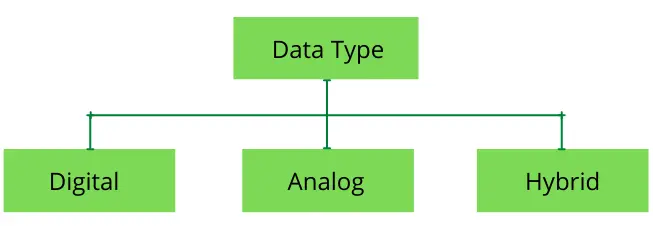
- Digital Computers: These computers process information that is in a binary or two-state format, either 0 or 1. They are known for their high accuracy and speed. Digital computers are used for a wide variety of applications, including business, education, and entertainment. Examples include personal computers (PCs), laptops, smartphones, and digital watches.
- Analog Computers: These computers process data that is continuous in nature, such as temperature, pressure, or voltage. They are not as precise as digital computers but can be very fast for certain types of problems. Analog computers are often used in scientific and industrial applications, such as in control systems and for simulation.
- Hybrid Computers: These computers combine features of both analog and digital computers. They have the speed of analog computers and the accuracy of digital computers. Hybrid computers are used for specialized applications where both types of data need to be processed, such as in medical equipment (e.g., ECG machines) and in scientific research.
1.4.2 Based on Capacity and Size

- Microcomputers (Personal Computers - PCs): These are the most common type of computer, designed for individual use. They are relatively inexpensive and are used for a wide variety of tasks, such as word processing, browsing the internet, and playing games. Examples include desktop computers, laptops, tablets, and smartphones.
- Minicomputers: These are mid-range computers that are more powerful than microcomputers but less powerful than mainframes. They are often used as servers in a network environment, supporting multiple users at the same time. Minicomputers are used in small and medium-sized businesses for applications such as accounting, inventory management, and customer relationship management.
- Mainframe Computers: These are large, powerful, and expensive computers that are used by large organizations for critical applications, such as bulk data processing, enterprise resource planning, and transaction processing. Mainframes are known for their high reliability, availability, and security. They are used by banks, airlines, and government agencies.
- Supercomputers: These are the fastest and most powerful type of computer. They are used for complex scientific and engineering calculations, such as weather forecasting, climate modeling, and molecular modeling. Supercomputers are very expensive and are owned by large research organizations and government agencies.
1.5 Characteristics of Computer
Exam Question Alert: Understanding the unique characteristics of computers is vital. You might be asked to explain these in detail.
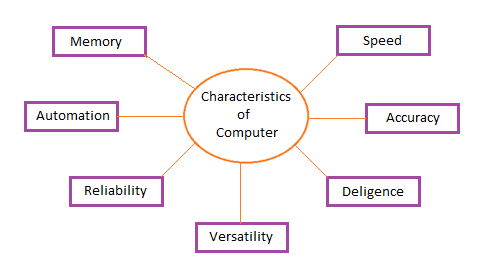
- Speed: A computer is a very fast device. It can perform a large amount of calculations in a few seconds. The speed of a computer is measured in terms of microseconds (10^-6), nanoseconds (10^-9), and picoseconds (10^-12). A powerful computer is capable of performing about 3-4 million simple instructions per second.
- Accuracy: The accuracy of a computer is consistently high. The degree of accuracy of a particular computer depends on its design. Errors can occur in a computer, but these are mainly due to human rather than technological weakness. This is often referred to as Garbage In, Garbage Out (GIGO).
- Diligence: A computer is free from tiredness, lack of concentration, fatigue, etc. It can work for hours without creating any error. If millions of calculations are to be performed, a computer will perform every calculation with the same accuracy. Due to this capability, it is more reliable than human beings.
- Versatility: Versatility is one of the most wonderful features of a computer. It can perform a wide range of tasks. One moment it can be used to prepare a document, the next moment it can be used to play a game, and so on. All this is possible by simply changing the program that is loaded into the computer's memory.
- Storage Capability: A computer has a very large memory. It can store a large amount of data. The storage capacity of a computer is measured in terms of kilobytes (KB), megabytes (MB), gigabytes (GB), and terabytes (TB). A computer can store data for a long time and can retrieve it whenever required.
- Automation: A computer is an automatic machine. Once a program is given to the computer, it can work automatically without any human intervention. The computer can be programmed to perform a series of tasks automatically.
- Reliability: A computer is a reliable machine. Modern electronic components have long lives. Computers are designed to make maintenance easy.
1.6 Applications of Computer
Exam Question Alert: Be prepared to discuss the diverse application areas of computers in the real world.
Computers have become indispensable in almost every aspect of modern life, revolutionizing industries and daily activities. Some key application areas include:
- Business: Computers are used in business organizations for payroll calculations, budgeting, sales analysis, financial forecasting, managing employees database, and stock control. They are also used for electronic commerce (e-commerce) which includes online shopping, net banking, and online trading.
- Education: Computers are used in education for online classes, online examinations, referring e-books, online tutoring, and computer-based training. They are also used by teachers to prepare notes and presentations.
- Healthcare: Computers are used in hospitals to maintain the records of patients, diagnose diseases, and to monitor the condition of patients. They are also used in medical research.
- Communication: Computers are used for communication through email, instant messaging, and video conferencing. They are also used to access the internet, which is a vast source of information.
- Scientific Research and Engineering: Computers are used in scientific research for complex calculations, data analysis, and simulation. They are used in engineering for designing and testing new products.
- Entertainment: Computers power the entertainment industry, from sophisticated gaming experiences and movie production (CGI) to music creation, streaming services, and immersive virtual _n reality. They provide rich, interactive, and diverse forms of digital entertainment.
- Banking and Finance: Computers are critical in banking and finance, enabling online banking, real-time stock trading, automated teller machine (ATM) services, sophisticated financial forecasting, and robust fraud detection systems. They ensure secure and efficient financial transactions.
- Government: Governments utilize computers for managing census data, national defense systems, law enforcement operations, maintaining public records, and implementing e-governance initiatives to deliver public services more efficiently. They enhance administrative capabilities and public safety.
Important Questions
- Define Computer? Explain different generations of computer in details. (8)
- Define computer. Explain different types of computer on the basis of size and speed. (7)
- Define Computer. Explain the characteristics of computer in details. (8)
- Define Computer. Write down the application areas of computer in details. (8)
- What is computer? Explain the different generations of computer with major electronic components and other related technologies. (7)
- Briefly explain history of computer. What is the role of IT in a competitive market? (7)