Data Communication And Computer Network
Unit 6: Data Communication and Computer Network
Exam Focus: This unit is crucial for understanding how computers communicate. Pay close attention to data transmission modes and media, different types of networks, and especially network topologies, as these are frequently tested concepts.
6.1 Data Communication
6.1.1 Introduction to Data Communication
Data Communication is the process of transmitting digital or analog data between two or more computing devices, systems, or locations via some form of transmission medium. It forms the backbone of all networked interactions, from sending an email to browsing the web.
6.1.2 Basic Elements of a Communication System
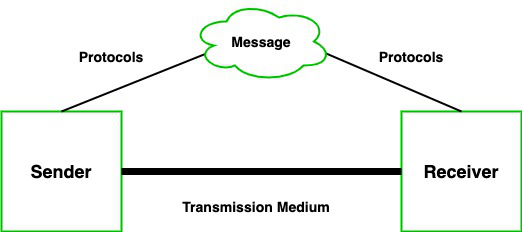
A communication system requires five basic elements to function effectively:
- Sender (Source): The device that originates the data message (e.g., a computer, smartphone).
- Receiver (Destination): The device that receives the data message.
- Medium: The physical path over which a message travels (e.g., cables, airwaves).
- Message: The data or information to be communicated.
- Protocol: A set of rules governing how data is exchanged, ensuring that both sender and receiver understand each other (e.g., TCP/IP).
6.1.3 Data Transmission Modes
Exam Question Alert: Be prepared to define and differentiate between Simplex, Half-Duplex, and Full-Duplex transmission modes with examples.

Data transmission modes define the direction of flow of information between two linked communication devices. Understanding these modes is crucial for designing and troubleshooting communication systems, as each mode has specific characteristics regarding data flow and efficiency.
| Mode | Description | Characteristics | Example |
|---|---|---|---|
| Simplex | Data flows in only one direction from sender to receiver. The communication channel is entirely dedicated to one-way transmission. | Unidirectional communication; no acknowledgment from receiver to sender. Simple but limited for interactive communication. | Radio broadcasting, traditional television broadcasts, a computer sending data to a printer, a keyboard sending input to a computer. |
| Half-Duplex | Data can flow in both directions between sender and receiver, but not simultaneously. The channel alternates between sending and receiving. | Bidirectional but alternating communication; takes turns to send/receive. More flexible than simplex, but slower for rapid exchanges. | Walkie-talkies (one person speaks while the other listens, then roles switch), citizen band (CB) radio, early internet dial-up modems. |
| Full-Duplex | Data can flow simultaneously in both directions between sender and receiver. The communication channel supports concurrent two-way transmission. | Bidirectional and simultaneous communication; highly efficient for interactive and high-speed data exchange. Requires more complex circuitry. | Telephone conversations (both parties can speak and listen at the same time), high-speed Ethernet connections, instant messaging applications. |
6.1.4 Data Transmission Speed
Data transmission speed defines the capacity of the transmission medium, typically measured in bits per second (bps).
- Narrowband: Low speed, typically below 64 Kbps. Used for legacy systems like telegraph and low-speed modems.
- Voiceband: Medium speed, generally 300 bps to 9600 bps. Historically used for voice and basic phone-line modems.
- Broadband: High speed, offering transfer rates of 1 Mbps and higher. Used for high-speed internet, video streaming, and modern local area networks (LANs).
6.1.5 Data Transmission Media
Exam Question Alert: Explaining different transmission media in detail is a common exam question.
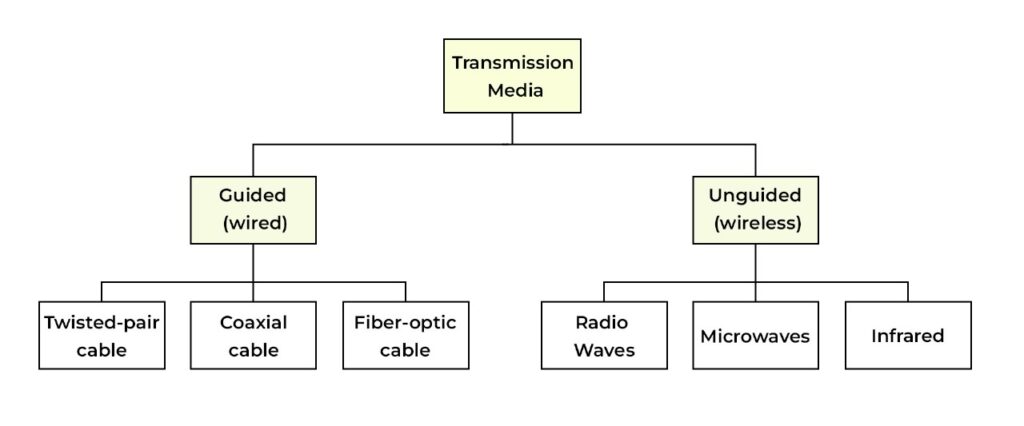
Data transmission media are the physical channels or pathways through which data travels from a sender to a receiver. These media can be broadly categorized into two main types: guided (wired) media, where signals are confined to a solid medium, and unguided (wireless) media, where signals propagate through the air or space. The choice of transmission medium significantly impacts the speed, reliability, cost, and range of a communication system.
Guided Media
1. Twisted Pair Cable
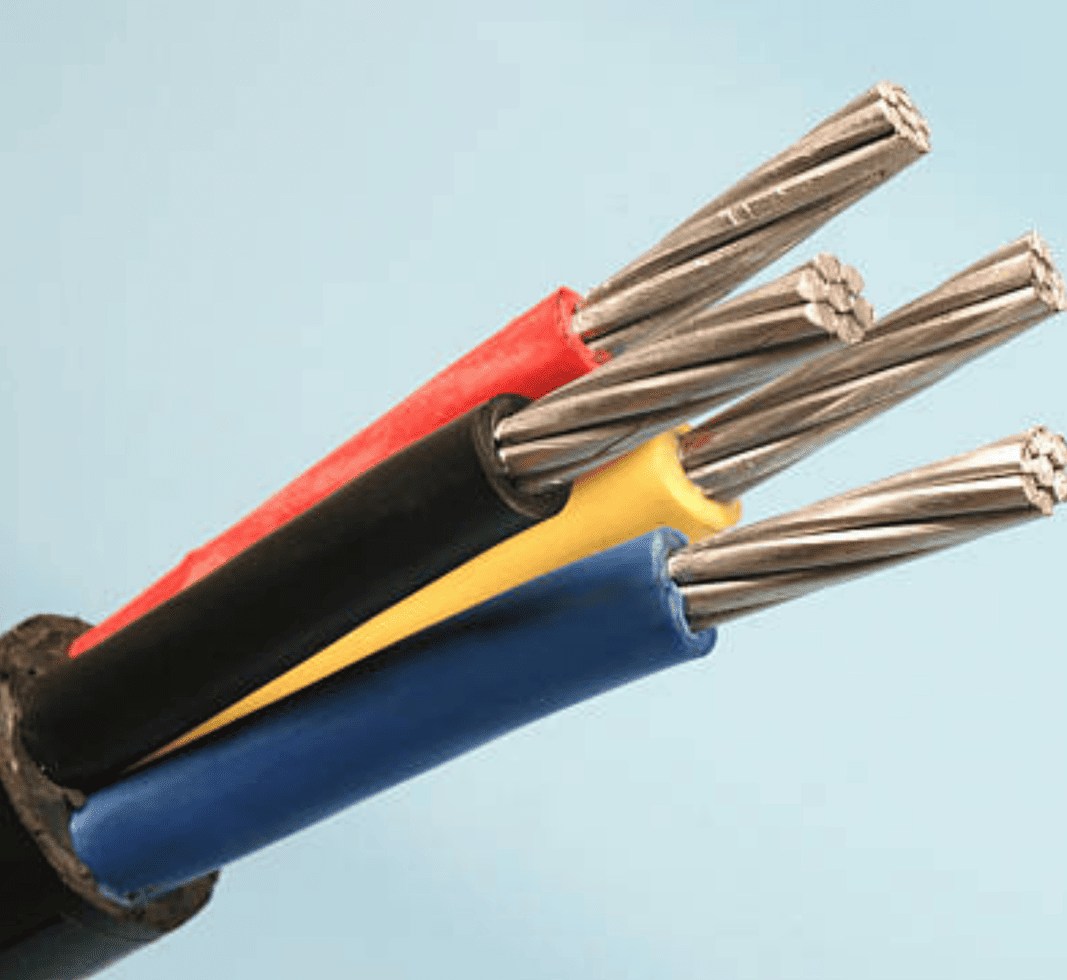
1. Unshielded Twisted Pair (UTP):
Advantages of UTP:
● Low cost and widely available.
● Simple and quick to install.
● Suitable for short-distance communication.
Disadvantages of UTP:
● Susceptible to external interference, especially in noisy environments.
● Limited to shorter distances compared to other types of cables.
2. Shielded Twisted Pair (STP):
Advantages of STP:
● Provides better protection against interference and crosstalk.
● Can handle higher data transmission rates.
Disadvantages of STP:
● More expensive than UTP.
● More difficult to install due to its rigidity and complexity.
2. Coaxial Cables
● High bandwidth and low signal loss.
● Provides good protection against noise and interference.
● Easy to expand the network by adding additional cables.
Disadvantages of Coaxial Cables:
● Expensive for long-distance communication.
● Bulky and harder to install in confined spaces.
● A single point of failure can affect the entire network.
3. Optical Fiber Cables
Optical fiber cables are advanced guided media that transmit data using light pulses. Made of thin glass or plastic strands, they carry light signals with minimal loss, making them ideal for long-distance and high-speed communication. Their structure ensures high bandwidth, low interference, and excellent performance in modern networks.
● Extremely high bandwidth, capable of transmitting massive amounts of data.
● Immune to electromagnetic interference, making them suitable for environments with high levels of electrical noise.
● Lightweight and capable of long-distance communication without significant signal loss.
Disadvantages of Optical Fiber Cables:
● Expensive to install and maintain.
● Fragile and prone to damage if not handled carefully.
● Difficult to splice and repair if damaged.
Unguided Media
Unguided media, also known as wireless or unbounded media, refers to transmission paths where electromagnetic signals are transmitted through the air without the need for physical cables.This type of media is used for wireless communication over long distances and in areas where installing cables is impractical or impossible.
There are three types of Unguided Transmission Media:
1. Radio Waves
Radio waves are a type of unguided transmission media that carry electromagnetic signals over long distances. They can penetrate walls and obstacles, making them ideal for broadcasting technologies like AM/FM radio, television, and mobile communication. This wireless technology supports wide-area coverage and is widely used in everyday communication systems.● Can be generated easily and travel long distances.
● Ideal for broadcasting over wide areas.
● Can penetrate buildings and other obstacles.
Disadvantages of Radio Waves:
● Prone to interference from other signals and environmental factors.
● Less secure because the signals can be intercepted by unauthorized users.
2. Microwave
Microwave communication is a wireless transmission method using high-frequency radio waves for point-to-point data transfer. It transmits electromagnetic signals and requires a clear line of sight between antennas. Widely used in mobile networks, satellite links, and building-to-building communication, it supports high-speed, long-distance data transmission but is sensitive to physical obstructions.● Supports high-speed data transmission.
● Suitable for long-distance communication.
● Can handle large volumes of data traffic.
Disadvantages of Microwave Communication:
● Requires precise alignment of antennas for clear line-of-sight transmission.
● Affected by weather conditions like rain and snow, which can degrade signal quality.
3. Infrared
Infrared (IR) communication is a short-range wireless transmission method that uses infrared light signals. Commonly found in remote controls and personal devices, it requires a direct line of sight and cannot pass through walls. Its limited range enhances security by reducing external interference and unauthorized access.● Immune to interference from other radio signals.
● Provides a secure connection for short-range communication.
● Commonly used in personal electronic devices and home automation systems.
Disadvantages of Infrared Communication:
● Limited range and cannot pass through walls or obstacles.
● Requires line-of-sight between the transmitter and receiver.
4. Satellite Communication
Satellite communication is a specialized form of microwave transmission that uses satellites to relay high-frequency signals between Earth stations. Unlike typical microwave links that require direct line-of-sight over short distances, satellite systems enable global coverage, including remote areas. However, they involve higher costs and longer latency due to the vast signal travel distance to space and back.● Provides global coverage, making it ideal for long-distance communication.
● Can be used in remote or inaccessible areas where traditional communication infrastructure is not available.
Disadvantages of Satellite Communication:
● High cost of deployment and maintenance.
● Signal latency due to the long distances between the Earth and satellites.
● Weather conditions such as heavy rain can degrade signal quality.
| Type | Medium | Description & Application | Advantages | Disadvantages |
|---|---|---|---|---|
| Guided (Wired) | Twisted-Pair Wire | Consists of two insulated copper wires twisted together to reduce electromagnetic interference (EMI) from external sources and crosstalk between adjacent pairs. Used for telephone lines (UTP) and older Ethernet (LANs). | Inexpensive, easy to install, widely available. | Limited bandwidth, susceptible to noise and attenuation over long distances, relatively low security. |
| Coaxial Cable | Features a central copper conductor surrounded by an insulating layer, a braided metal shield, and an outer plastic jacket. The shielding provides better resistance to EMI than twisted-pair. Used for cable television, older LANs (e.g., 10Base2, 10Base5 Ethernet), and short-distance connections. | Higher bandwidth than twisted-pair, better noise immunity, more secure. | More expensive and harder to install than twisted-pair, still susceptible to some interference. | |
| Optical Fibers | Transmits data as pulses of light through thin strands of glass or plastic. Each fiber is about the diameter of a human hair. Offers extremely high bandwidth, immunity to electrical interference, and can transmit data over very long distances with minimal signal loss. Used for backbone networks, high-speed internet (Fiber-to-the-Home/FTTH), and data centers. | Extremely high bandwidth, very long transmission distances, immune to electromagnetic interference, highly secure. | Very expensive to install, difficult to splice and repair, requires specialized equipment. | |
| Unguided (Wireless) | Radio Waves | Electromagnetic waves with frequencies ranging from 3 kHz to 300 GHz. They are omnidirectional and can penetrate walls, making them suitable for broadcasting. Used for AM/FM radio, television, cordless phones, and wireless LANs (Wi-Fi). | Easy to install, can cover large areas, mobile communication possible. | Susceptible to interference, lower security, limited bandwidth compared to fiber optics. |
| Microwave System | Uses high-frequency radio signals (typically 2 GHz to 40 GHz) transmitted via line-of-sight parabolic antennae. Microwaves are unidirectional and do not easily penetrate solid objects. Used for long-distance terrestrial communication (point-to-point), cellular networks, and satellite communication. | High bandwidth, suitable for long-distance communication, no cabling required. | Requires line-of-sight, susceptible to weather conditions (rain fade), high installation cost for towers. | |
| Communication Satellite | Utilizes geostationary or low-earth orbit satellites to relay signals over very long distances, covering vast geographical areas. Signals are sent from an earth station to a satellite (uplink) and then retransmitted back to another earth station (downlink). Used for global communication, TV broadcasting, satellite internet, and GPS. | Global coverage, suitable for remote areas, high bandwidth for broadcasting. | High latency (delay), very high cost, susceptible to signal degradation (rain fade), security concerns. |
6.2 Computer Network
6.2.1 Definition of Computer Network
A Computer Network is an interconnected group of two or more independent computers and peripheral devices linked together to share resources (data, hardware, software) and communicate. Networks enable efficient resource utilization, faster communication, and centralized data management.
6.2.2 Types of Computer Network
Exam Question Alert: Expect questions asking you to define and differentiate between various types of computer networks (PAN, LAN, MAN, WAN).
Computer networks are classified based on their geographical scope, the number of devices they connect, and their ownership. This classification helps in understanding their design, purpose, and the technologies used to implement them.
| Type | Acronym | Range | Description & Application |
|---|---|---|---|
| Personal Area Network | PAN | Few meters (typically up to 10 meters) | Connects devices around a single person, such as smartphones, tablets, headphones, and wearable devices. Technologies like Bluetooth and infrared are commonly used. Example: Connecting a phone to wireless earbuds or a smartwatch. |
| Local Area Network | LAN | Small geographical area (e.g., a single office, building, or a small campus) | Connects computers and peripheral devices within a limited area, allowing resource sharing (printers, files) and communication. Ethernet and Wi-Fi are common LAN technologies. Example: All computers and printers connected in an office building or a home network. |
| Campus Area Network | CAN | Multiple buildings within a limited geographical area (e.g., a university campus, corporate park) | Interconnects multiple LANs within a defined campus area. It's larger than a LAN but smaller than a MAN. Example: A university network connecting various departmental buildings, libraries, and dormitories. |
| Metropolitan Area Network | MAN | City or a large geographical area (typically spanning a city or a large town) | Connects multiple LANs across a metropolitan area. It's often owned and operated by a single entity (like a city government or a large corporation) but can also be a public network. Example: Connecting various branch offices of a company within a city, or a city-wide Wi-Fi network. |
| Wide Area Network | WAN | Large geographical area (e.g., across countries or continents) | Connects networks over vast distances. WANs are typically used to connect LANs and MANs, allowing global communication. The Internet is the largest and most well-known example of a WAN. Example: Connecting a company's headquarters in one country to its branch offices in other countries. |
Advantages and Disadvantages of Networking:
| Advantages | Disadvantages |
|---|---|
| Resource Sharing: Enables users to share expensive resources like printers, scanners, and software licenses. | High Initial Setup Cost: Cabling, hardware (routers, switches), and configuration can be expensive. |
| Communication: Facilitates fast, efficient communication (email, instant messaging, video conferencing). | Security Vulnerabilities: Networks are susceptible to data breaches, viruses, and other cyber threats. |
| Centralization of Data: Data can be stored on a central server for easier backup, management, and access control. | Network Failure: If the central server or critical network component fails, the work of all connected systems can be halted. |
6.2.3 Network Topologies
Exam Question Alert: Explaining different network topologies with diagrams (or textual descriptions) and their advantages/disadvantages is a very common and important exam question.
Network topology refers to the physical or logical arrangement of the network components (nodes, links, etc.) and how they are connected to each other. It dictates how data flows within the network, influencing its performance, reliability, scalability, and cost. Understanding different topologies is crucial for designing efficient and robust computer networks.
- Bus Topology:
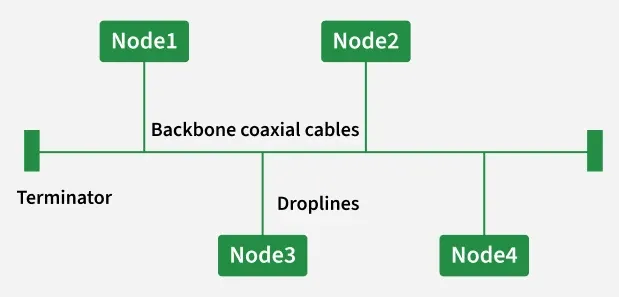
- Description: In a bus topology, all devices in the network are connected to a single central cable, often called the backbone or bus. Data is transmitted along this single cable, and all devices receive the signal, but only the intended recipient processes it. Terminators are used at both ends of the cable to absorb the signal and prevent reflections.
- Advantages: It is simple to install and requires less cabling than other topologies, making it cost-effective for small networks.
- Disadvantages: A single cable failure can take down the entire network. It is difficult to troubleshoot problems, and performance degrades significantly as more devices are added to the network due to increased collisions.
- Star Topology:
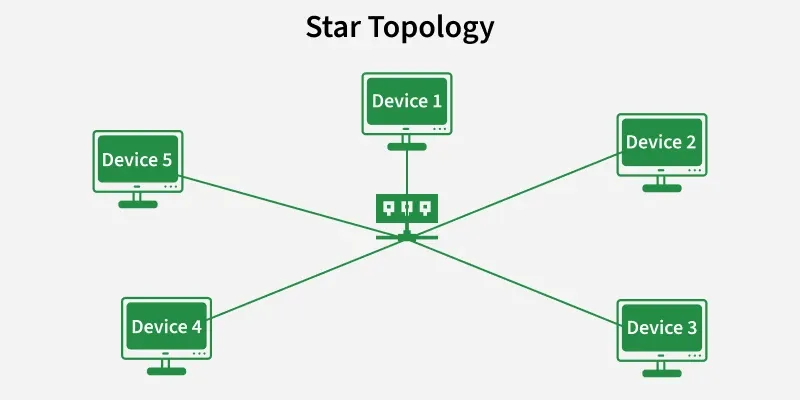
- Description: In a star topology, all devices are connected individually to a central hub, switch, or server. Each device has a dedicated connection to the central device, and all communication between devices must pass through this central point.
- Advantages: It is easy to install and manage. The failure of one device or its cable does not affect the rest of the network. Troubleshooting is also easier as faults can be isolated quickly.
- Disadvantages: It requires more cabling than a bus topology, leading to higher installation costs. If the central hub or switch fails, the entire network becomes inoperable.
- Ring Topology:
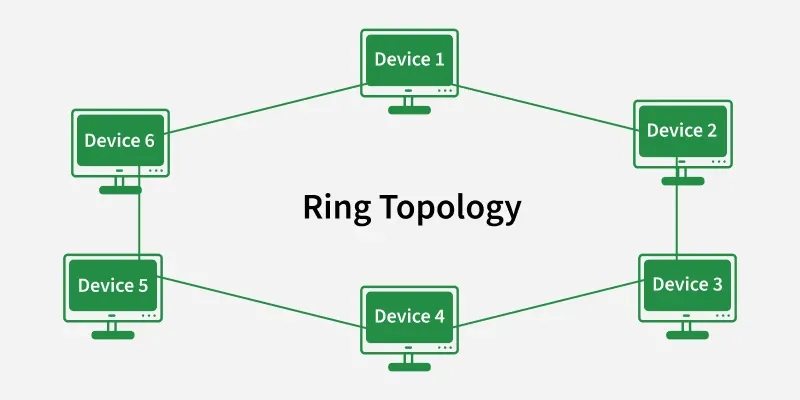
- Description: In a ring topology, devices are connected in a closed loop, forming a continuous circle. Data travels in one direction (unidirectional) around the ring, passing through each device until it reaches its destination. Each device acts as a repeater, regenerating the signal.
- Advantages: Data transfer can be high-speed, and collisions are typically avoided (especially in token ring networks where a token is passed around to grant transmission rights).
- Disadvantages: The failure of a single link or device can disrupt the entire network. Adding or removing devices is difficult and requires temporarily shutting down the network.
- Mesh Topology:
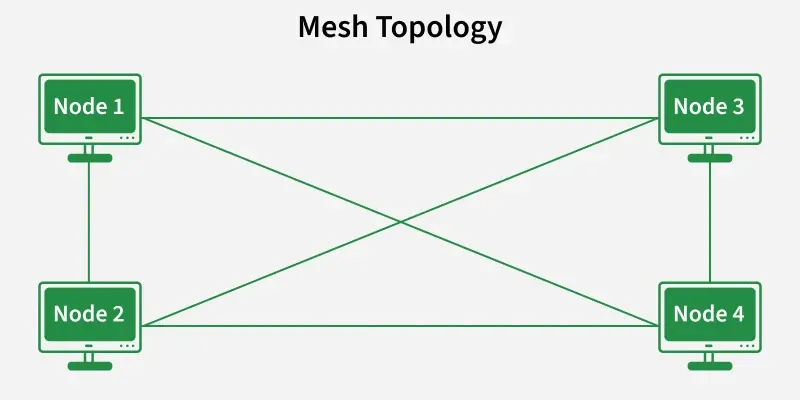
- Description: In a mesh topology, every device in the network is connected directly to every other device. This creates multiple redundant paths for data transmission.
- Advantages: It offers extremely high reliability and fault tolerance because if one path fails, data can be rerouted through another. It is used in critical networks where continuous operation is paramount.
- Disadvantages: It is very expensive and complex to implement due to the excessive amount of cabling and the number of connections required (n*(n-1)/2 connections for n devices).
-
Tree Topology:
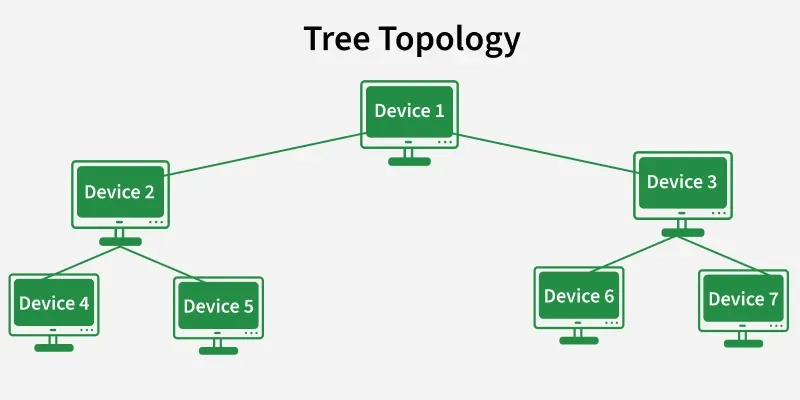
- Description: A tree topology is a hierarchical structure that combines characteristics of both bus and star topologies. It has a central root node, which connects to other nodes (branches), and these branches can further connect to more nodes, forming a tree-like structure.
- Advantages: It is easy to extend and manage. Fault isolation is easier than in a bus topology, as problems can often be traced to a specific branch.
- Disadvantages: If the central hub or backbone cable fails, entire segments of the network can become inoperable. It can be complex to configure and requires significant cabling.
-
Hybrid Topology:
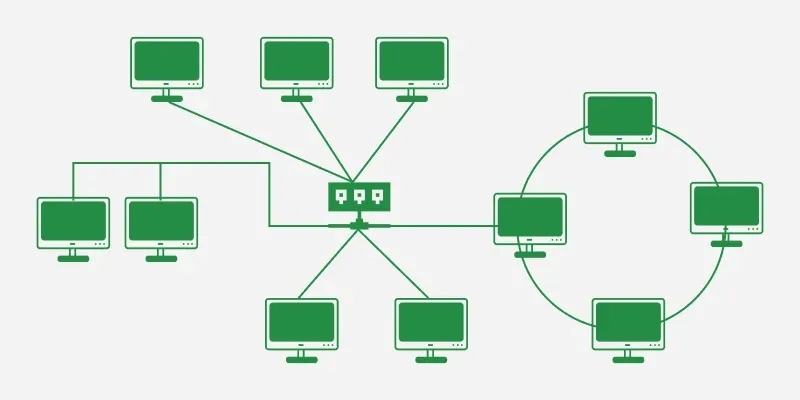
- Description: A hybrid topology is a combination of two or more different basic network topologies (e.g., a star-bus topology where several star networks are connected via a bus backbone).
- Advantages: It offers great flexibility and scalability, allowing organizations to design networks that meet specific requirements and integrate existing network components.
- Disadvantages: Hybrid topologies are typically complex to design, implement, and manage. They can also be more expensive due to the combination of different hardware and software components.
6.3 Intranet, Extranet, and Internet
Exam Question Alert: Differentiating between Intranet, Extranet, and Internet is a common short note or comparison question.
While often used interchangeably by the general public, Intranet, Extranet, and Internet refer to distinct types of networks with different scopes, access levels, and purposes. Understanding their differences is crucial in the context of network security, information sharing, and business operations.
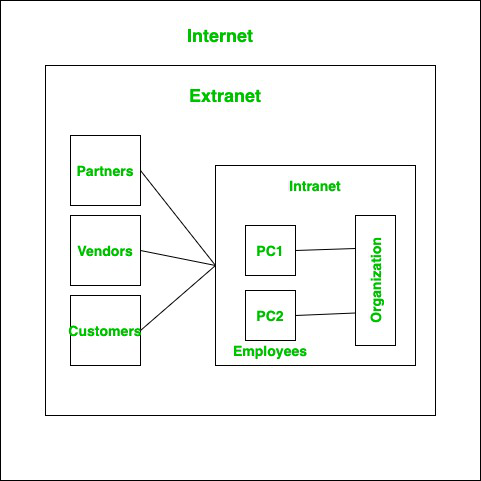
- Internet: The Internet is a vast, public, and global system of interconnected computer networks that uses the standard Internet Protocol Suite (TCP/IP) to serve billions of users worldwide. It is a decentralized network accessible to everyone, offering a wide range of services such as the World Wide Web, email, file transfer, and online gaming. It is characterized by its open access and global reach.
- Intranet: An Intranet is a private network belonging to an organization, accessible only to its members, employees, or other authorized users. It uses Internet protocols and technologies (like web browsers, FTP, email) but is secured by firewalls and other security measures to restrict external access. Intranets are primarily used for internal communication, collaboration, and sharing of company resources and information within the organization.
- Extranet: An Extranet is an extension of an organization's Intranet that allows controlled access to authorized external users, such as customers, vendors, suppliers, or business partners. It facilitates secure business-to-business (B2B) communication and collaboration by providing limited access to specific internal resources. Extranets are typically secured with usernames, passwords, and often VPN (Virtual Private Network) technology to ensure data privacy and integrity.
Comparison Table: Intranet, Extranet, and Internet
| Feature | Internet | Intranet | Extranet |
|---|---|---|---|
| Access | Public, global access | Private, internal to an organization | Private, controlled access for external partners |
| Scope | Worldwide | Limited to an organization | Extended to authorized external entities |
| Users | Anyone with an internet connection | Employees and authorized internal personnel | Employees plus authorized external partners (customers, suppliers) |
| Security | Minimal inherent security, relies on user-level precautions | High security (firewalls, access controls) | High security (firewalls, VPNs, authentication) |
| Purpose | Global information sharing, communication, commerce | Internal communication, collaboration, resource sharing | Secure B2B communication, shared projects, supply chain management |
6.4 E-mail (Electronic Mail)
Exam Question Alert: E-mail is often covered in short notes or questions comparing its role with the Internet.
Electronic mail, commonly known as e-mail, is a method of exchanging messages ("mail") between users using electronic devices. It is one of the most earliest and most widely used applications on the Internet, revolutionizing personal and professional communication. E-mail allows for asynchronous communication, meaning senders and recipients do not need to be online simultaneously to exchange messages.
- Definition: E-mail is a digital communication method that enables the creation, sending, receiving, and storing of text-based messages (and often attachments like documents, images, and videos) over computer networks, primarily the Internet. It relies on a store-and-forward model, where messages are sent to a mail server and retrieved by the recipient when they are online.
-
Role in Modern Life: E-mail remains an indispensable
tool in various aspects of modern life:
- Formal Communication: It is the standard for professional and formal communication in businesses, educational institutions, and government.
- Marketing and Advertising: Companies use email marketing campaigns to reach customers, promote products, and share updates.
- Customer Service: Many organizations provide customer support and handle inquiries via email.
- Digital Identity and Verification: An email address is often required to sign up for online services, and it plays a crucial role in account verification, password resets, and two-factor authentication.
- Collaboration: Teams use email to share documents, discuss projects, and coordinate tasks.
- Information Dissemination: Newsletters, alerts, and important announcements are frequently distributed via email.
Course Code: CMP 116
Credit Hours: 3
This unit provides comprehensive knowledge about data communication principles and computer networking concepts.
Important Questions
- What is network topology? Explain basic network topologies with diagram. (7)
- Define computer network. Explain different types of computer network. (7)
- Define Network. Explain different types of network topologies in brief. (8)
- What is computer network. Explain different network topologies with their advantages and disadvantages. OR Define Data Communication. Explain different transmission media in details. (7)
- Write short notes on: (Any two)
- Intranet & Extranet
- Data Transmission Modes
- Internet and E-mail