Basic Organization Of Computer
Unit 2: Basic Organization of Computer
Exam Focus: This unit is critical for understanding how a computer works internally. Expect detailed questions on the functional units and the block diagram of a computer system.
2.1 Basic Functions of Computer
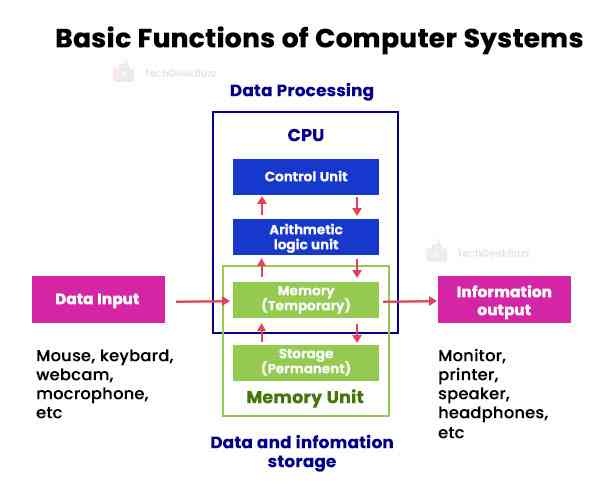
At its core, a computer performs five fundamental operations to process data and provide meaningful information:
- Input: Receiving data and instructions from the user or other sources.
- Processing: Performing arithmetic and logical operations on the data as per instructions.
- Output: Presenting the processed results to the user.
- Storage: Saving data and instructions for immediate or future use.
- Control: Managing and coordinating all the operations within the computer system.
2.2 Basic Functional Organization of Computer
A digital computer system is a complex arrangement of various interconnected functional units, each designed to perform specific tasks. These units work in harmony to enable the computer to receive input, process data, store information, and produce output. The functional organization is best understood through a block diagram, which visually represents the flow of data and control signals between these essential components. Understanding this fundamental architecture is crucial for comprehending how a computer operates at a basic level.
Exam Question Alert: You will very likely be asked to draw and explain the block diagram of a digital computer. Practice drawing it and understanding the role of each unit.
Functional Units Explained:
2.2.1 Input Unit
The Input Unit serves as the interface between the user or external data sources and the computer system. Its primary role is to accept data and instructions in a human-readable format (or other external formats) and convert them into a binary code (machine-readable format) that the Central Processing Unit (CPU) can understand and process. This conversion is crucial because computers operate on electrical signals representing binary digits (0s and 1s). Without an efficient input unit, the computer would be an isolated system, unable to receive any commands, data, or information from the outside world, rendering it useless for practical applications.
- Keyboard: A common input device for entering text, numbers, and commands.
- Mouse: A pointing device used to control a cursor on a screen and select items.
- Scanner: Converts physical documents or images into digital data.
- Microphone: Captures audio input, converting sound waves into electrical signals.
- Joystick: Primarily used for gaming and controlling movement in virtual environments.
- Webcams: Capture still images and live video, converting visual information into digital data.
- Touchscreen: Allows users to interact directly with the display by touching it.
- Barcode Reader: Reads barcodes and translates them into digital data.
2.2.2 Central Processing Unit (CPU)
Often referred to as the "brain" of the computer, the Central Processing Unit (CPU) is arguably the most crucial component. Its primary responsibilities include executing program instructions, performing arithmetic and logical operations, and managing the overall flow of data and control within the computer system. The CPU continuously fetches instructions from memory, decodes them to understand what operation needs to be performed, and then executes these operations. This cycle of fetch, decode, and execute is fundamental to all computer operations. The CPU is composed of three main parts:
- Arithmetic Logic Unit (ALU): This is the digital circuit within the CPU that performs all arithmetic operations (such as addition, subtraction, multiplication, and division) and logical operations (like comparisons: greater than, less than, equal to, NOT, AND, OR). The ALU is where the actual computation and decision-making processes take place, making it a core component for data manipulation.
- Control Unit (CU): The Control Unit acts as the central nervous system of the computer. It is responsible for directing and coordinating all operations within the computer system. The CU fetches instructions from main memory, interprets them, and then issues control signals to other components (like the ALU, memory, and I/O devices) to ensure that instructions are executed correctly and in the proper sequence. It does not perform actual data processing but rather manages and synchronizes all operations.
- Registers: Registers are small, high-speed storage locations that are an integral part of the CPU itself. They are used to temporarily hold data, instructions, and memory addresses that the CPU is currently processing or needs to access very quickly. Because they are located directly within the CPU, registers provide the fastest possible access to data, significantly improving the CPU's efficiency and performance by reducing the need to access slower main memory frequently.
2.2.3 Memory Unit

The Memory Unit is a fundamental component of a computer system responsible for storing data and instructions. It acts as the computer's short-term and long-term recall system, enabling the CPU to access the information it needs to perform tasks. Memory is broadly categorized into primary and secondary storage, each serving different purposes based on speed, capacity, and volatility.
-
Primary Memory (Main Memory): This type of memory is
directly accessible by the CPU and is characterized by its high speed.
It temporarily holds data and programs that are currently being
executed or are needed for immediate processing. Primary memory is
typically volatile, meaning its contents are lost when the computer is
turned off.
- RAM (Random Access Memory): RAM is a volatile, read/write memory. It allows data to be read from or written to any location in approximately the same amount of time, regardless of the data's physical location. It's used for active data and program instructions.
- ROM (Read Only Memory): ROM is non-volatile memory, meaning its contents are retained even when power is off. It typically stores essential startup instructions (like the BIOS or UEFI firmware) that are required to boot the computer and load the operating system. Data in ROM is usually programmed during manufacturing and cannot be easily altered.
-
Secondary Storage: Also known as auxiliary storage,
secondary storage provides permanent storage for large amounts of data
and programs. Unlike primary memory, it is non-volatile and retains
its contents even when the computer is powered down. Secondary storage
is slower than primary memory but offers significantly higher capacity
at a lower cost per bit.
- Hard Disk Drives (HDD): Traditional storage devices that use spinning platters and read/write heads to store and retrieve data magnetically.
- Solid State Drives (SSD): Newer storage devices that use flash memory to store data, offering much faster performance, lower power consumption, and greater durability than HDDs.
- USB drives (Flash Drives): Portable, non-volatile storage devices that use flash memory, commonly used for data transfer and backup.
- Optical Disks (CD/DVD/Blu-ray): Storage media that use lasers to read and write data, primarily used for software distribution, multimedia, and backup.
2.2.4 Output Unit
The Output Unit is the component of the computer system that presents the processed information (results) from the computer to the user or to another computer system. Its main function is to convert the binary data processed by the CPU back into a human-readable or usable format. This allows users to interact with the computer's results, whether it's viewing text, images, listening to audio, or receiving physical copies of documents.
- Monitor: A visual display unit that shows text, images, and video output.
- Printer: Produces hard copies of electronic documents on paper.
- Speakers: Output audio signals, allowing users to hear sounds, music, and voice.
- Projector: Displays computer output onto a large screen or surface.
- Headphones: Provide private audio output to the user.
2.2.5 Bus System

The Bus System is a critical communication backbone within a computer, consisting of a set of electronic pathways (wires or traces on a circuit board) that connect all the internal components. Its primary function is to facilitate the transfer of data, memory addresses, and control signals between the Central Processing Unit (CPU), main memory (RAM), and all other peripheral devices. Without a robust bus system, the various parts of the computer would be unable to communicate and coordinate their activities, making computation impossible. There are typically three main types of buses:
- Address Bus: This is a unidirectional bus that carries memory addresses from the CPU to other components, such as RAM and I/O devices. When the CPU wants to read data from or write data to a specific memory location or I/O port, it places the address of that location on the address bus. The width of the address bus determines the maximum amount of physical memory that the computer system can address.
- Data Bus: This is a bidirectional bus that carries the actual data being transferred between the CPU, memory, and other peripherals. When the CPU reads from memory or an I/O device, data travels from the memory/device to the CPU via the data bus. When the CPU writes to memory or an I/O device, data travels from the CPU to the memory/device. The width of the data bus determines how many bits can be sent at once, impacting the system's overall data transfer rate.
- Control Bus: This bus carries control signals from the CPU to other components and vice-versa. These signals manage and synchronize operations throughout the computer system. Examples of control signals include read/write signals (indicating whether the CPU wants to read or write data), timing signals, interrupt requests, and bus grant signals. The control bus ensures that all operations occur in the correct sequence and at the appropriate time.
2.3 The System Concept
The system concept in computing refers to the idea that all the functional units (input, processing, output, storage, and control) are not isolated but work together in an integrated and coordinated manner to achieve a common goal: processing information. Each component plays a vital role, and the failure of one can affect the entire system's performance. This holistic view emphasizes the interdependencies and interactions between hardware and software components to form a complete, functional computer system.
Course Code: CMP 116
Credit Hours: 3
This unit provides fundamental knowledge about the basic organization and functional behavior of a computer system.
Important Questions
- What is a Processing Unit? Mention the components of Processing Unit. OR Explain the digital computer system with diagram. Write about each sub system in details. (7)
- Briefly explain the functional units of a computer system along with its block diagram. (8)
- What are the functions of computer? Explain functional units of computer with diagram. (7)
- Draw the block diagram of Digital Computer. Explain each unit in detail. (7)
- Draw a functional diagram of digital computer also explain the functions of each unit in details. (8)
- Draw a Block Diagram to illustrate the basic organization of a computer system and explain the functions of the various units? (8)