Computer Software
Computer Software
Exam Focus: This unit is crucial for understanding the non-physical components of a computer. Expect questions on the types of software, their roles, and specific examples, as well as firmware and middleware.
3.1 Introduction to Software
Software is the intangible set of programs, procedures, and routines that instruct the hardware on what to do. It is the brain behind the brawn, enabling computers to perform a vast array of tasks, from simple calculations to complex simulations. Without software, hardware would be a mere collection of inert electronic components.
- Definition: Software is a collection of programs, data, procedures, and rules that perform specific tasks on a computer system.
- Role: It acts as an intermediary between the user/applications and the computer hardware, translating human-readable instructions into machine-executable code.
3.2 Logical System Architecture
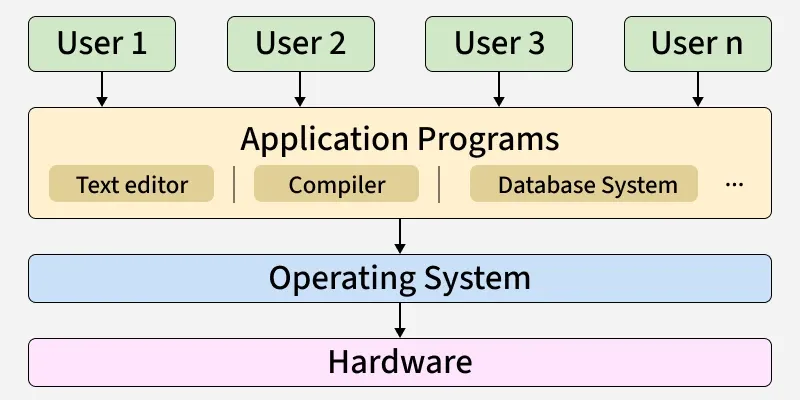
The logical system architecture describes the hierarchical structure and interaction between different layers of software and the underlying hardware. It illustrates how software components are organized and communicate to provide functionality.
- Hardware Layer: The foundational physical components (CPU, Memory, I/O devices).
- System Software Layer (Operating System): Manages hardware resources, provides a platform for applications, and acts as an interface between hardware and application software.
- Application Software Layer: Programs designed to fulfill specific user tasks (e.g., web browsing, document creation).
- User Layer: The end-user interacting with the system through application software.
Analogy: Think of it like an orchestra. The hardware is the instruments, the operating system is the conductor, and the application software is the sheet music for a specific song. The user is the audience enjoying the music.
3.3 Types of Software
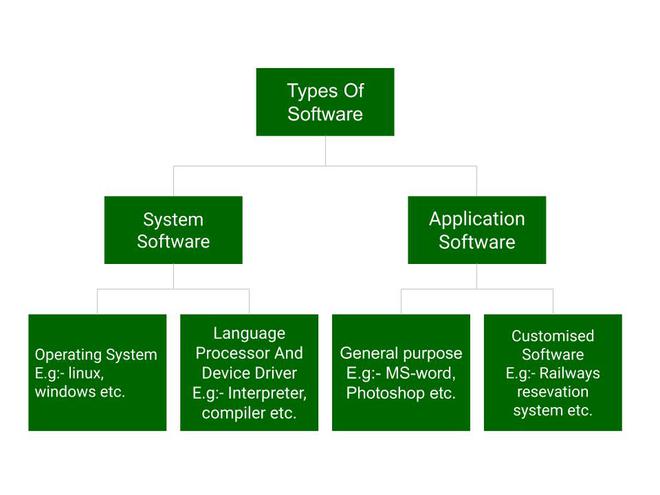
Software can be broadly categorized based on its purpose and how it interacts with the computer hardware and the user. Understanding these classifications is essential for comprehending the layered architecture of a computer system and the roles different programs play. The main types of software are System Software, Application Software, and Utility Software, each with distinct functions and examples.
Exam Question Alert: Expect questions asking you to define and differentiate between various types of software with real-life examples.
3.3.1 System Software
System software is a foundational layer of computer programs designed to manage and control the computer hardware, enabling application programs to execute effectively. It acts as an intermediary between the hardware and the user/application software, providing a platform for all other software to operate. Without system software, a computer would be unable to boot up, manage its resources, or interact with peripheral devices. Its primary role is to ensure the smooth and efficient operation of the entire computer system.
Types of System Software
- Operating System: It is the main program of a computer system. When the computer system ON it is the first software that loads into the computer's memory. Basically, it manages all the resources such as computer memory, CPU, printer, hard disk, etc., and provides an interface to the user, which helps the user to interact with the computer system.
- Language Processor: As we know that system software converts the human-readable language into a machine language and vice versa. So, the conversion is done by the language processor. It converts programs written in high-level programming languages like Java, C, C++, Python, etc(known as source code), into sets of instructions that are easily readable by machines(known as object code or machine code).
- Device Driver: A device driver is a program or software that controls a device and helps that device to perform its functions. Every device like a printer, mouse, modem, etc. needs a driver to connect with the computer system eternally. So, when you connect a new device with your computer system, first you need to install the driver of that device so that your operating system knows how to control or manage that device.
- Role: System software performs critical functions such as managing and controlling computer hardware components, allocating system resources (like memory and CPU time), providing a stable platform for application software to run, and handling essential tasks like process scheduling, file system management, and input/output operations.
-
Examples:
- Operating Systems (OS): These are the most prominent examples of system software. Operating systems like Windows, macOS, Linux, Android, and iOS manage all the computer's hardware and software resources, providing a user interface and enabling multitasking.
- Device Drivers: These are specialized software programs that enable specific hardware devices (e.g., printers, graphics cards, sound cards, webcams) to communicate with the operating system and other computer programs. Each hardware component typically requires a specific driver.
- Utility Software: While sometimes considered a separate category, utility software often falls under system software as it helps in maintaining and optimizing the computer system. Examples include antivirus software (for security), disk defragmenters (for improving storage efficiency), backup tools (for data protection), and file compression utilities.
3.3.2 Application Software
Application software, often simply called an "app," is a category of computer programs designed to perform specific tasks or a set of tasks for the end-user. Unlike system software, which manages the computer's internal operations, application software directly assists users in performing productive, creative, or entertainment-related activities. It "sits on top" of system software, relying on the operating system to manage hardware resources.
Types of Application Software
There are different types of application software and those are:
- General Purpose Software: This type of application software is used for a variety of tasks and it is not limited to performing a specific task only. For example, MS-Word, MS-Excel, PowerPoint, etc.
- Customized Software: This type of application software is used or designed to perform specific tasks or functions or designed for specific organizations. For example, railway reservation system, airline reservation system, invoice management system, etc.
- General Purpose Software (Off-the-Shelf Software): This type of software is developed for a broad market and is readily available for purchase or download. It's designed to meet the common needs of a large number of users (e.g., Microsoft Office Suite, antivirus programs).
- Customized Software (Bespoke Software): Developed specifically for a particular organization or individual to meet their unique requirements. This software is tailor-made, offering functionalities that off-the-shelf solutions might not provide (e.g., a custom inventory management system for a specific retail chain, a proprietary CRM system for a company).
- Role: Application software's primary role is to fulfill user needs and requirements. It provides the tools and functionalities that allow users to interact with the computer to achieve specific goals, ranging from document creation and data analysis to graphic design and gaming.
-
Examples:
- Word Processors: Software like Microsoft Word, Google Docs, or LibreOffice Writer are used for creating, editing, formatting, and printing text documents.
- Spreadsheets: Programs such as Microsoft Excel, Google Sheets, or Apple Numbers are designed for organizing, analyzing, and manipulating numerical data in tabular form, often used for financial calculations, budgeting, and data visualization.
- Web Browsers: Applications like Google Chrome, Mozilla Firefox, Microsoft Edge, or Safari enable users to access and navigate the World Wide Web, view web pages, and interact with online content.
- Multimedia Software: This category includes software for creating, editing, and playing various forms of media. Examples are VLC Media Player (for audio/video playback), Adobe Photoshop (for image editing), Adobe Premiere Pro (for video editing), and Spotify (for music streaming).
- Gaming Software: Video games, from simple mobile games to complex PC and console titles, fall under application software, providing entertainment and interactive experiences.
- Specific Purpose Software: These are applications tailored for particular industries or functions. Examples include accounting software (e.g., QuickBooks, Tally), Computer-Aided Design (CAD) software (e.g., AutoCAD, SolidWorks) for engineering and design, and Hospital Management Systems (HMS) for healthcare administration.
3.4 Firmware
Exam Question Alert: Firmware is a common short note question. Understand its definition, role, and examples.
Firmware is a specialized type of software that provides low-level control for a device's specific hardware. Unlike general-purpose software, firmware is typically embedded directly into the hardware component itself, residing in non-volatile memory such as Read-Only Memory (ROM), Erasable Programmable Read-Only Memory (EPROM), or Flash memory. This makes it a permanent part of the device, essential for its basic operation and functionality.
Common types of firmware include:
- BIOS
The Basic Input/Output System (BIOS) has been a critical component of computers since the very early days. The BIOS sits on a chip in a computer’s motherboard and issues a set of instructions that enables the device’s operating system to load. It is also responsible for looking after a device’s hardware components and ensuring they function correctly upon startup.
When a computer is turned on, the BIOS launches instructions that check the machine’s startup process for potential errors. It starts by checking the random access memory (RAM) and processor for faults, then checks connected devices, such as a keyboard and mouse, for any problems. It then checks for a boot sequence, such as Boot from Compact Disc Read-Only Memory (CD-ROM) and Boot from Hard Drive. Finally, the BIOS connects to the bootloader program, which wakes up the computer’s operating system and loads it in the RAM.
Aside from the device startup process, the BIOS is responsible for checking the Complementary Metal Oxide Semiconductor (CMOS), which is a piece of memory that stores BIOS settings, and other chips on a device. It also checks signals that are sent to the RAM, such as when a user presses a key, to help the operating system understand what action to take.
2. EFI
Extensible Firmware Interface (EFI) is a new generation of firmware that issues the instructions that a device’s CPU uses to start the hardware and initiate the bootloader. EFI is a replacement for BIOS and is used in new computers. It offers advantages like ensuring a device only boots trusted software and other cybersecurity benefits.
The original EFI firmware is used in Macs and can only support Intel processors. Unified EFI (UEFI) is a piece of firmware designed to replace the BIOS in new Windows computers and supports AMD and Intel processors. UEFI is used to load and start up operating systems in devices that run Windows 8 and beyond.
- Role: Firmware is essential for the device to boot up, perform basic input/output operations, and control its fundamental functions. It acts as the permanent software that "brings hardware to life," enabling it to communicate with other components and execute basic instructions before the main operating system loads. It manages the hardware's core functions and ensures its proper operation.
-
Examples:
- Firmware is also prevalent in various embedded systems and devices, including routers (managing network traffic), smart TVs (controlling display and smart features), printers (managing print jobs and hardware functions), digital cameras (controlling image capture and storage), and other IoT (Internet of Things) devices.
3.5 Middleware
Exam Question Alert: Middleware can also appear as a short note question. Focus on its purpose in connecting different applications.

Middleware is a type of software that acts as an intermediary layer between different applications, systems, or components, especially in distributed computing environments. Its primary function is to enable seamless communication and data exchange between disparate software components that might be running on different platforms, using different programming languages, or developed independently. Essentially, it "glues" together different parts of an application or different applications themselves, abstracting away the complexities of underlying network protocols and operating systems.
Types of Middleware
- Remote Procedure Call (RPC): A program can ask for a service from another program running on a different computer or network using this protocol, which is provided via middleware.
- Messaging middleware: It makes it easier for dispersed apps and services to communicate with one another.
- Embedded middleware: enables integration and communication between real-time operating systems and embedded applications.
- API middleware: lets programmers design and control the APIs in their applications.
- Transaction or transactional middleware: This uses transaction process monitoring to make sure transactions proceed smoothly from one stage to the next.
- Role: Middleware plays a crucial role in modern enterprise applications by facilitating complex client-server interactions, enabling message passing between applications, and managing data across diverse systems. It simplifies the development of distributed applications by providing a consistent interface and a set of services that developers can use, rather than having to write custom integration code for every interaction. This reduces development time and improves system interoperability.
-
Examples:
- Application Servers: Platforms like Apache Tomcat, JBoss, or WebLogic provide an environment for running web applications and enterprise applications, handling tasks such as transaction management, security, and concurrency.
- Message-Oriented Middleware (MOM): Systems such as Apache Kafka, RabbitMQ, or ActiveMQ enable asynchronous communication between different applications by sending and receiving messages. This is particularly useful in microservices architectures and event-driven systems.
- Database Middleware: This type of middleware connects applications to various database systems, abstracting the specifics of database protocols. Examples include ODBC (Open Database Connectivity) and JDBC (Java Database Connectivity), which provide standard APIs for database access.
- Web Servers: While often considered separate, web servers like Apache HTTP Server or Nginx can also act as middleware, serving web content and routing requests to application servers.
Course Code: CMP 116
Credit Hours: 3
This unit provides fundamental knowledge about computer software, its types, and architectural concepts.
Important Questions
- Explain the types of Computer Software? Explain with real-life examples. (8)
- What is computer software? Explain types of application software. (7)
- Define software and program. Explain the different types of software with example. (7)
- What is Software? Explain different types of software used in computer system. (8)
- What is system software? Explain different types of software. (7)
- Write short notes on: Firmware and Middleware